Showing posts with label SQL Server 2008. Show all posts

Friday, 17 February 2012

SQL SERVER – 2008 – Copy Database With Data – Generate T-SQL For Inserting Data From One Table to Another Table

how to generate script for data from database as well as table. SQL Server 2008 has simplified everything.

Let us take a look at an example where we will generate script database. In our example, we will just take one table for convenience.

Right Click on Database >> Tasks >> Generate Scripts >>


This will pop up Generate SQL Server Scripts Wizards >> Click on Next >> Select Database >> This will bring up a screen that will suggest to Choose Script Option.


On Choose Script Option Screen of Script Wizard under section Table/View Options Look at Script Data row and Turn the Option to True.


The Next Screen will ask about object types. Select all the objects that are required in the generated script. Depending on the previous screen it will show few more screen requesting details about the objects required in script generation.


On the very last screen it will request output options. Select the desired output options of Script to file, Script to Clipboard or Script New Query Window.3


Clicking on Finish button will generate a review screen containing the required objects along with script generating data.


Clicking on Finish button one more time will generate the requested output.


Similarly, if you want to generate data for only one table, you can right click on the table and follow almost a similar wizard.

How To Add And Remove SQL Server 2008 / 2008R2 Instances

After installing Visual Studio 2010, inadvertently ended up with SQL Server 2008 Express having already installed SQL Server 2008 Developer. Only when was going to upgrade to SQL Server 2008R2  and found out,  had two instances installed.

Looked everywhere for a place to remove the SQLEXPRESS instance but couldn’t find it.

To uninstall the entire SQL Server suite and start over I found how to do it.


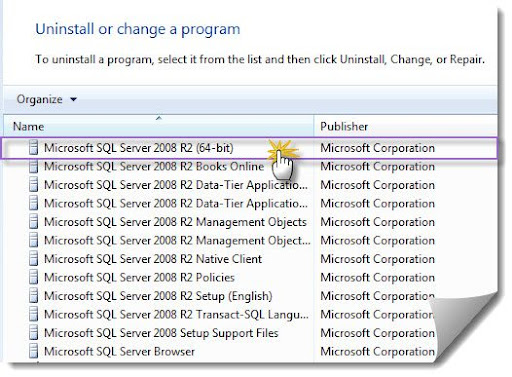
On Windows 7, go to Programs and Features and choose Microsoft SQL Server 2008 R2 (64-bit) (or whatever your version of SQL Server you want to add or remove and instance from).


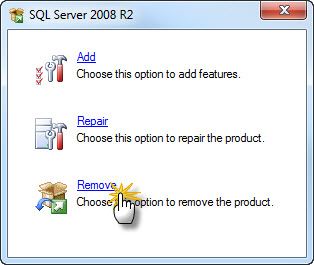
Choose Remove (or Add, if you want to add a new instance).


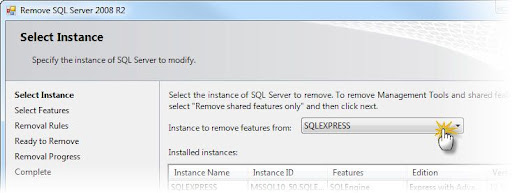
Follow the steps and choose which instance you want to remove.


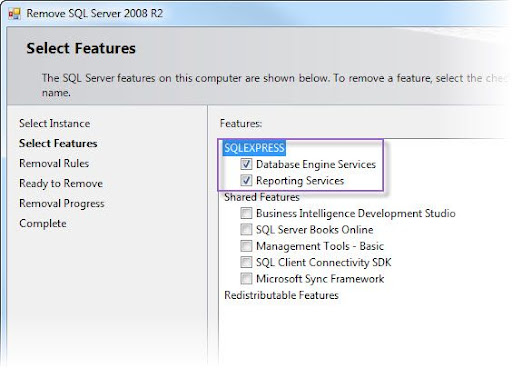
Select the features of that instance you want to remove (select all to remove the instance).
Note: Don’t remove shared features if you don’t want to remove any other instances.